



reCAPTCHA: An end to a mailbox full of spam.
Say you want to be reachable for your customers:
✔ You add a contact form to your website.
✔ Customers can now easily reach you.
But unfortunately… besides customer messages you receive a lot of spam, unwanted and strange messages in your mailbox. Often coming from bots. How can you stop this? Google has a solution for this: reCAPTCHA.
First a quick step back, what exactly is a bot? 🤖
Think of a bot as a software application that performs automatic tasks on the internet. These are often simple, structured tasks, carried out many times faster than a human ever could. According to incapsula.com, in 2016 half of internet users were a bot. These bots can be either good or malicious.

Source: https://www.incapsula.com/blog/bot-traffic-report-2016.html
Examples of benign bots are bots that play computer games, consult a web page (for example the Google bot) or, for instance, chat. Malicious bots are, for example, bots that visit your website by the thousands at once, causing it to become overloaded. Or, for example, sending automatic messages to your website. To counter this, Google introduced reCAPTCHA.
But what does reCAPTCHA do?
reCAPTCHA is a system developed by Google to determine whether the computer user is a human and not a bot.
How does reCAPTCHA work?
- As soon as reCAPTCHA is installed on a website or webshop, Google will watch how a user behaves on the website.
- If, when submitting a contact form, Google suspects the user could possibly be a bot, reCAPTCHA will be triggered.
- The user is asked to click the ‘I’m not a robot’ checkbox, as shown below:
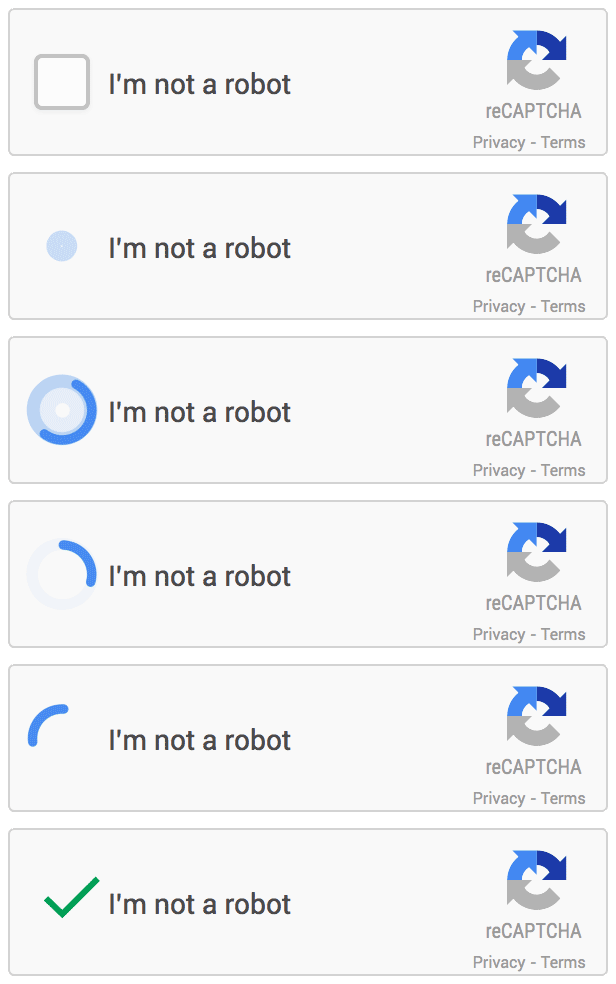
- Often followed by a kind of ‘puzzle’, which needs to be solved. However, you only get to see this ‘puzzle’ at the moment Google suspects the user is a bot. Such a puzzle looks like this:

- This way, it’s made almost impossible in nearly all cases for bots to send spam
Interested in reCAPTCHA? Then read directly how to install reCAPTCHA on your website .
How does Google know if you’re a bot?
Google assesses whether the user is a bot by measuring a number of factors during the website visit. What exactly these factors are isn’t fully known, and Google won’t fully share that either. But some factors that play a role are:
- IP address: Has this IP address already been recognised as a bot before?
- The resources being loaded: A simple bot doesn’t load images or other elements, a normal user does.
- Login: Is someone logged in with a Google account? Does this account belong to a real person? Or is this an unknown account?
- Behaviour: How does someone behave on the website? Does someone scroll calmly through a page or click on every possible and strange spot on the website?
- History: Do you have a search history in your internet browser? Bots often don’t have a search history.
Nowadays reCAPTCHA is used about 100 million times a day. Widely used websites include Facebook, Twitter and CCN.com.
What does a reCAPTCHA look like on a website?
To get a good idea of what reCAPTCHA looks like, you’ll find a demo here. This demo shows a sample contact form.
Different versions
It remains a difficult and ongoing process to tell bots and people apart. That’s also why Google keeps developing reCAPTCHA. reCAPTCHA’s slogan is “Tough on Bots, Easy on Humans.” The goal here is to keep making reCAPTCHA more user-friendly. So Google has developed several versions in recent years to improve usability:
- In 2007 reCAPTCHA asked users to retype words. A line was struck through the word so bots couldn’t decipher the words themselves.

- In 2012 reCAPTCHA started using house numbers from Google Street View.

- In 2014 reCAPTCHA asked the user to select one or more images from a set of nine images. As in the example below.

Which versions are currently available?
Currently two versions of reCAPTCHA are available, namely:
reCAPTCHA v2 – Within this version you have 3 different options:
- Checkbox: Every user has to click the checkbox when filling in a contact form. When reCAPTCHA suspects the user is a bot, a ‘puzzle’ is shown.
- Invisible: reCAPTCHA isn’t visible. It’s only shown when a button on the website is clicked, for example a ‘submit’ button.
- Android: This is a reCAPTCHA that protects your Android app.
reCAPTCHA v3 the newest reCAPTCHA version is only shown once the user goes above a certain ‘risk score’. How high this ‘risk score’ may be, you can determine yourself. On top of that, you can indicate to Google which are the most important pages of the website, so they’re given extra protection.
How do I make use of reCAPTCHA?
Below is a step-by-step plan for how you make sure reCAPTCHA gets integrated:
- Create an API key
If you want to use reCAPTCHA, you’ll need to create an API key. This key creates a link between reCAPTCHA and your website. You create this key via this website. - Fill in the fields
Now it’s your task to fill in the fields. Which reCAPTCHA you want to set up depends on your needs .
- Register
Then click the register button, and you’ll see a key you need to use for the integration on your website.
- Install
- WordPress
Installing reCAPTCHA v2 within WordPress is fairly simple and can be done with a plugin. Unfortunately there’s no plugin available yet for reCAPTCHA v3. Our specialists are happy to help with integrating this. - Joomla
Joomla has a standard option to integrate reCAPTCHA. You can read how to do this here.
Conclusion
Spam that comes in via bots can cause a lot of chaos in your mailbox. What’s more, it can come at the expense of your website’s usability, which can in turn affect your online findability. To counter this spam, reCAPTCHA is a good solution that’ll improve the quality of your website!
Need help adding reCAPTCHA to a contact form?
Do you need help adding reCAPTCHA? Depending on the type of website you have, we can help with this. Get in touch directly or call 0591-71 46 99.